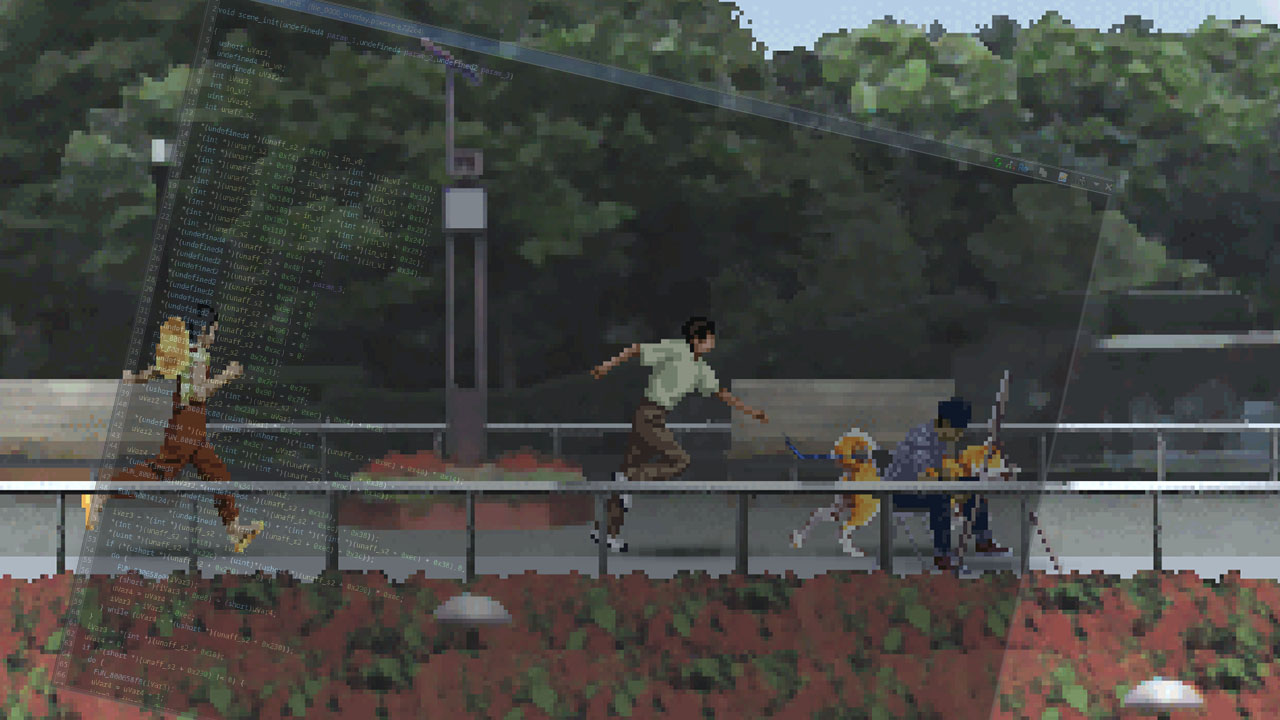
I’ve been taking a look at Yuuyami Doori Tankentai which is an obscure Japanese horror game released in 1999 about three junior high school students exploring urban legends set in a stereotypical Japanese city called Hirumi City that was born out of Japan’s economic boom during the 80s and has fell off hard after the economic bubble popped. It was based on an actual city in Japan called Hino, located west of Tokyo and I’ve even found some landmarks that match (I may write a different article about it soon maybe?).
Now while I can barely read Japanese and can only speak it offensively (Tekken wa kusoda, boku wa street fighter daisuki), it didn’t stop me from appreciating the rotoscoped/impressionist-ish aesthetics of this game and the “vibe” that this game has.
Heads up
Yuuyami Doori is the most fucked up game I have ever reverse-engineered (even for a PlayStation 1 game). From my experience, reverse-engineering Japanese games will usually make me feel one of the three: “What moron wrote this that made the compiler generate such horrifying assembly code?”, “Straight forward and simple” and “Terry Davis God’s third temple as an operating system levels of sophistication”. Yuuyami Doori made me feel all three at once so if you want to take a look at the game’s internals by yourself then you have been warned. I will try my best to document my findings here and in later parts of this series.
Passive Observations
Just some cool observations I did before getting into the actual internals of the game.
Time of day and how it affects the environment
This game’s environment is surprisingly dynamic, it has day/night cycle system that makes the world feel pretty immersive.
The environment sprites to change their lighting based on the current time. In the 7-Eleven which is east to the Junior High School, it has 4 different “levels” of lighting.
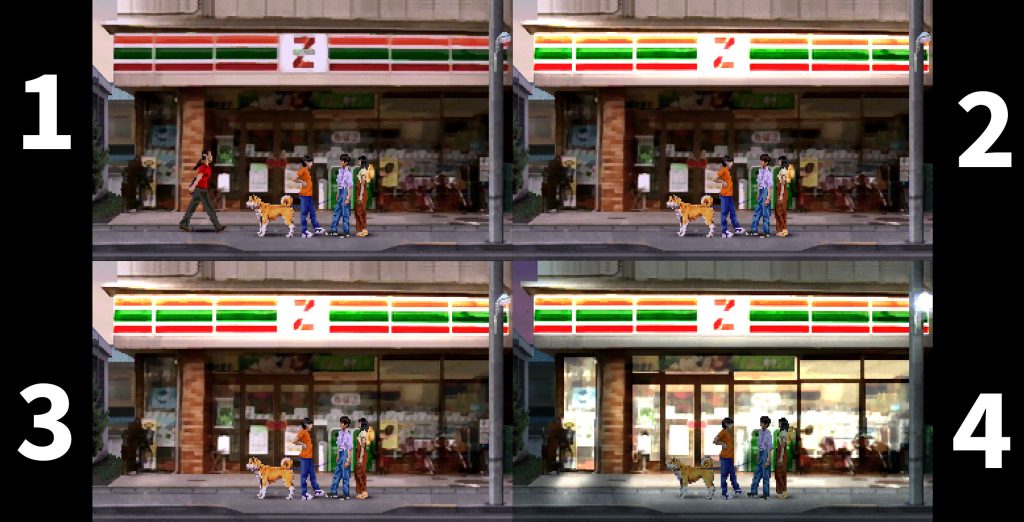
- Has no lights and it’s just a simple texture
- The “Z” sign lights up
- The shop interior becomes a little brighter and the street lights turn on
- The shop interior is fully lit and so are the street lights
This also happens for houses too.
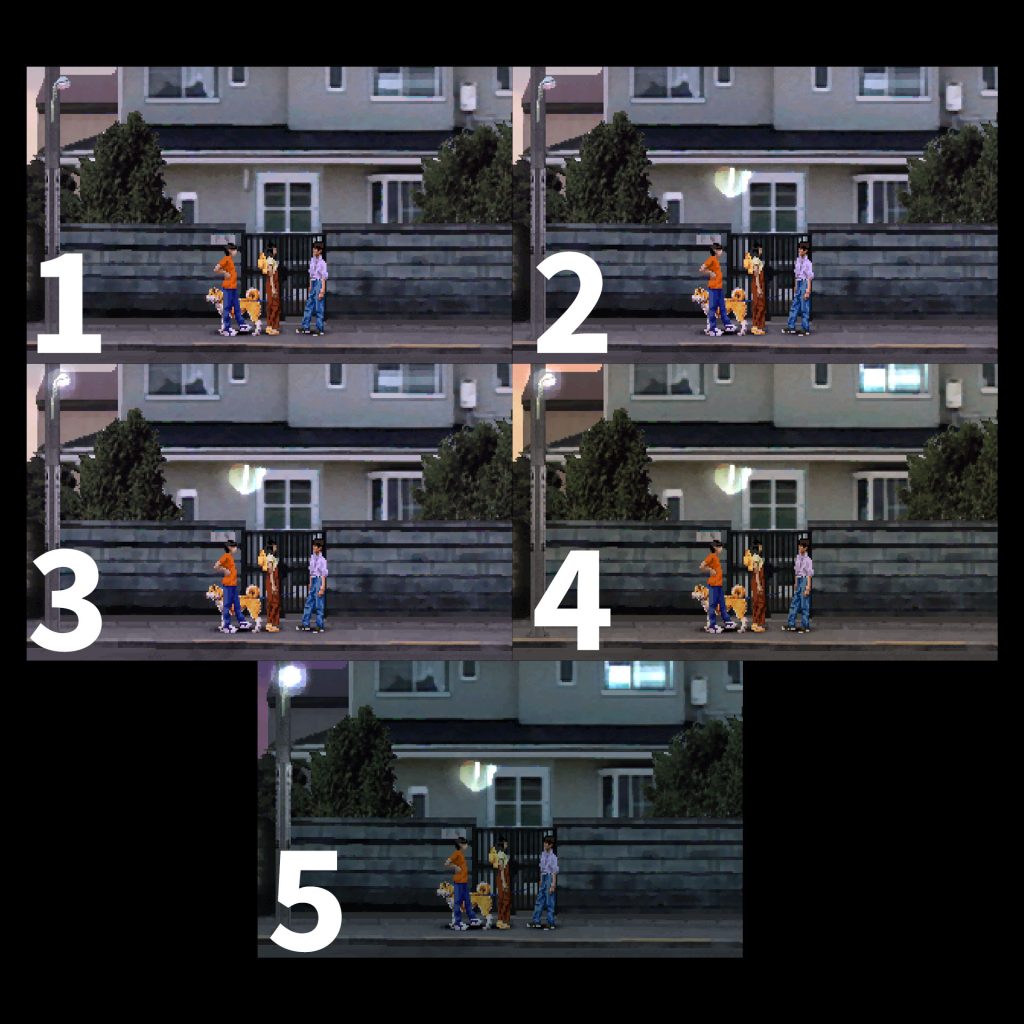
- Default sprites
- Door light turns on
- Street light turns on
- House interior windows turn on (In that house only one window seems to turn on)
- If it’s evening then street lights become brighter
The environment audio also changes based on the current time, I’ve observed this around the Junior High School. You can hear strange (and honestly quite unsettling) sounds of trumpets? kazoos? from morning until 17:30 hits. I’ve provided a video example with audio. In the first 10 seconds you can these sounds and 10 seconds later when it’s 17:30 in-game, the sounds stop. Very immersive though i’d hate to live anywhere near this place because of the noise.
Misc
The park has lots of moving parts too like birds that fly away when you get close to them and NPCs that do cool shit.
You may have noticed that the characters wear different colors everyday. There are too many small details to document here and I believe that there are even more little details and different environment changes based on the story progression, one example of that is how some classmates don’t show up to school based on certain events with them that happened throughout the story.
Actual Reverse Engineering
This is where the least fun part begins, analyzing and reverse engineering the game’s binary.
The PS1 Executable (slps_002.74)
The game’s executable is actually a shell, it doesn’t actually contain any game logic and the whole thing was compiled using the PsyQ SDK. It houses the graphics pipeline, a file system loader, an overlay dispatcher and initializes a few bunch of stuff like the SPU sound system. It acts as resident host shell or a “micro kernel”. Think of it as an exe file that all it does is load a .dll file (or .so/.a file for the linux nerds) and the dll is the file that actually contains game logic but in an era where consoles couldn’t do this natively. The best way I can describe it is like the source engine’s game exe and client.dll or Unity’s exe loading Assembly-CSharp.dll (before IL2CPP took over, I know it’s a horrible oversimplication).
It goes a little something like this:
/**
 * Yuuyami Doori Tankentai (SLPS-02274)
 * This file is highly pseudo but it shows more or less how the exe behaves.
 */

#include <sys/types.h>
#include <stdlib.h>
#include <libgte.h>
#include <libgpu.h>
#include <libgs.h>
#include <libetc.h>
#include <libpad.h>

/*
 * Scene-specific rendering and logic context
 * Located inside GameContext at offset +0x33D4 bytes (word index 0xCF5)
 */
typedef struct {
    int *sprite_array;          /* Offset 0x0060 (+0x18): Active Sprite Objects */
    int *z_ordering_table;      /* Offset 0x0070 (+0x1C): GPU Ordering Table (OT) */
    int *acd_pixel_data;        /* Offset 0x00D0 (+0x34): ACD raw pixels */
    int *acd_frame_memory;      /* Offset 0x00F0 (+0x3C): Animation frame buffers */
    int *current_sprite;        /* Offset 0x0110 (+0x44): Selected active sprite? */
    unsigned short scene_id;    /* Offset 0x0270 (+0x9C): Trigger Scene ID */
    unsigned short scene_state; /* Offset 0x0278 (+0x9E): Execution scene state */
    unsigned short scene_flags; /* Offset 0x0298 (+0xA6): Scene execution flags */
    int *acd_header;            /* Offset 0x03B0 (+0xEC): ACD file header pointer */
    int *evd_sections[11];      /* Offset 0x03C0 (+0xF0 to +0x114): EVD Sections 0-10 */

    /*
     * evd_sections[8] (+0x110) points to Section 8 bytecode.
     * evd_sections[9] (+0x114) points to Section 9 dialogue pointers.
     */
    unsigned int render_mode;    /* Offset 0x05E0 (+0x178): Mode flags */
    unsigned short sprite_count; /* Offset 0x08C0 (+0x230): Active sprites in frame */

    /* Text rendering engine parameters */
    unsigned short text_y_pos;  /* Offset 0x5428 (+0x150A): Layout Y coordinate */
    unsigned short text_width;  /* Offset 0x5430 (+0x150C): Layout width boundary */
    unsigned short text_line_h; /* Offset 0x5448 (+0x1512): Spacing height */
    unsigned short text_limit;  /* Offset 0x5410 (+0x1504): GPU limits */

    char text_render_buf[400]; /* Offset 0x5A00 (+0x1680): Active text buffer? */
    int *text_buf_ptr_1;       /* Offset 0x5A70 (+0x169C): Cache buffer 1? */
    int *text_buf_ptr_2;       /* Offset 0x5A80 (+0x16A0): Cache buffer 2? */
} SceneContext;

/*
 * Persistent Global Game Context
 * Stored at RAM: 0x80050F30 - 0x8005B3F8
 */
typedef struct {
    int *overlay_func_table; /* Offset 0x0000: Pointer to active overlay export table */
    int active_scene_id;     /* Offset 0x0004: Currently loaded scene/area ID */
    int frame_counter;       /* Offset 0x0008: VSync execution frame counter */

    /* Padding/undocumented engine variables (RAM: 0x80050F3C - 0x80054300) */
    char pad[13012];

    /* Host-to-Overlay state variables (RAM: 0x800542F4 - 0x80054303) */
    unsigned short loop_idx;   /* Offset 0x339C (+0xCE8): Function loop counter */
    unsigned short state_var;  /* Offset 0x33A0 (+0xCEE): Working registers */
    unsigned short loop_flag;  /* Offset 0x33A4 (+0xCEF): State iteration control */
    unsigned int loader_flags; /* Offset 0x33D0 (+0xCF4): Memory lock & status flags */

    /* Active file/archive links */
    int flb_group_list[16];   /* Offset 0x33D4 (+0xCF5): FLB file list descriptors */
    int asset_cache_ptr;      /* Offset 0x3420 (+0xD08): Pointer to asset cache buffer */
    int local_file_table[16]; /* Offset 0x3444 (+0xD11): Loaded descriptors */

    /* Scene logic execution engine */
    SceneContext scene; /* Offset 0x34B0 (+0xCF5): Scene and graphics context */
} GameContext;

/* Global Game Context structure instance (RAM: 0x80050F30) */
GameContext DAT_80050f30;
extern int DAT_8005b3f8;

/* Entry point (0x8001210C) */
void start(void)
{
    int *bss_ptr;

    // Clear BSS global data segment to zero
    bss_ptr = (int *)&DAT_80050f30;
    do {
        *bss_ptr = 0;
        bss_ptr++;
    } while (bss_ptr < &DAT_8005b3f8);

    // Call main C entry point
    c_main();
}

/* Main C Entry Point (0x80012AC0) */
void c_main(void)
{
    __main();         /* Compiler dummy call */
    sdk_init();       /* Reset hardware and init SDK libraries */
    FUN_80012c1c();   /* Enter main game lifecycle wrapper */
    sdk_shutdown();   /* Release graphics and sound drivers on exit */
}

/* Main Game Lifecycle Wrapper (0x80012C1C) */
void FUN_80012c1c(void)
{
    game_loop_init(); /* Setup event routines, timers and register VSyncCallback */
    FUN_800120d8();   /* Execute primary loading sequence and main game overlay loop */
    FUN_80012850();   /* Cleanup/shutdown wrapper */
}

/* Master Boot Sequence (0x800120D8) */
void FUN_800120d8(void)
{
    extern GameContext DAT_80050f30;
    load_master_assets_and_init_context(&DAT_80050f30);
    boot_game_manager(&DAT_80050f30);
}

/* Engine Shutdown / Cleanup (0x80012850) */
void FUN_80012850(void)
{
    FUN_8001a780();
    FUN_80017854(); // goodbye
}


/* Compiler dummy function */
void __main(void)
{
    return;
}

/* Core SDK Subsystems Reset & Boot (0x80012B3C) */
void sdk_init(void)
{
    ResetCallback();
    spu_audio_init();
    pad_controller_init();
    cdrom_driver_init();
    gpu_graphics_init();

    init_mem_allocator();
    init_software_registers();

    // Load config maps and structures into Game Context
    extern int DAT_80054a34, DAT_80054440, DAT_800550f4;
    load_context_param_a(&DAT_80054a34);
    load_context_param_b(&DAT_80054440);
    load_context_param_c(&DAT_800550f4);
}

/* Game Loops & Root Timer Interrupt Registration (0x800127E8) */
void game_loop_init(void)
{
    // Prepare card controllers, sound buffers and graphics DMA
    init_card_controller();
    init_sound_buffers();
    init_graphics_dma();

    // Start root clock timer for game logic frames
    StartRCnt(RCntCNT0);

    // Enable BIOS event interrupts
    EnableEvent(0);
    EnableEvent(0);

    // Update player input queues
    poll_inputs();

    // Register the VSync vertical retrace callback (non-zero value registers FUN_8001add4)
    FUN_8001ac68(0xffffffff);
}


/* Process controller inputs & flush draw queues (0x80012418) */
void poll_inputs(void)
{
    extern int DAT_80054440, DAT_80054a28, DAT_8005522c, DAT_80055340;
    char *input_buffer = (char *)&DAT_80054440;
    int idx = 0;

    DAT_80054a28 = 0;

    // Loop over controller ports (up to 4 controllers)
    do {
        int *pad_raw_bits = &DAT_8005522c + DAT_80055340;
        int prev_bits = *pad_raw_bits;

        // Read raw pad status bits from BIOS registers
        *pad_raw_bits = FUN_800129b8();
        int active_bits = FUN_800129b8();

        DAT_80055340 = active_bits & 0x3f;

        unsigned int filtered_inputs = 0;
        int shift_idx = 0;
        do {
            if (prev_bits < 0) {
                filtered_inputs |= 1 << (shift_idx & 0x1f);
            }
            shift_idx++;
            prev_bits <<= 1;
        } while (shift_idx < 32);

        // Store filtered inputs in context struct
        *(unsigned int *)(input_buffer + 0xeec) = filtered_inputs;
        idx++;
        input_buffer += 4;
    } while (idx < 4);

    // Synchronize frame drawing
    FUN_800195a4();
    FUN_80014fbc();
}

/*
 * Load Master Archives & Init Context (0x80011158)
 * Maps FILELINK.FLB and XALINK.XA, loads the root system overlays.
 */
void load_master_assets_and_init_context(GameContext *context)
{
    extern int PTR_DAT_80044a28;

    // Set root overlay function table pointer
    context->overlay_func_table = &PTR_DAT_80044a28;
    FUN_8001db20(1);

    // Initialize XALINK.XA
    int *xa_link_ptr = (int *)context + 0xD2C;
    FUN_8001edbc(xa_link_ptr);
    FUN_8001ee58(xa_link_ptr, "DATA\\XALINK.XA");

    // Initialize FILELINK.FLB (Master asset archive)
    int *flb_loader = context->flb_group_list;
    FUN_8001cc0c(flb_loader);
    FUN_8001cc0c(context->local_file_table);
    FUN_8001cc74(flb_loader, "DATA\\FILELINK.FLB"); // Opens FLB and caches descriptors
    FUN_8001d2dc(flb_loader, 0xffffffff);
    FUN_8001db20(1);

    // Load root overlays from FLB
    // Index 2
    int *buffer_d1a = (int *)context + 0xD1A;
    FUN_8001cc0c(buffer_d1a);
    FUN_8001cd48(buffer_d1a, flb_loader, 2);
    FUN_8001d2dc(buffer_d1a, 0xffffffff);
    FUN_8001db20(1);

    // Index 0 (Main overlay base)
    int *buffer_d08 = &context->asset_cache_ptr;
    FUN_8001cc0c(buffer_d08);
    FUN_8001cd48(buffer_d08, flb_loader, 0);
    FUN_8001d2dc(buffer_d08, 0xffffffff);
    FUN_8001db20(1);

    // Index 1
    int *buffer_d23 = (int *)context + 0xD23;
    FUN_8001cc0c(buffer_d23);
    FUN_8001cd48(buffer_d23, flb_loader, 1);
    FUN_8001d2dc(buffer_d23, 0xffffffff);

    // Wire up internal context pointers and clear buffers
    int **ctx_ptrs = (int **)context;
    ctx_ptrs[0xCF5] = (int *)context + 1; // context->scene pointer
    ctx_ptrs[0xCF6] = (int *)context + 0x2E3;
    ctx_ptrs[0xCF7] = (int *)context + 0x4E3;
    // ...more internal memory mapping and initial flag setups

    FUN_80014124((int *)context + 0xCF4, 0, 4); // Clear state flags
}

/* Core state loader & overlay linking loop (0x80011DCC) */
void boot_game_manager(GameContext *context)
{
    int *config_buffer;
    int *file_loader;
    int overlay_base;
    int exit_status;

    config_buffer = &context->asset_cache_ptr;
    file_loader = context->local_file_table;

    do {
        // Reset local setup variables
        *(unsigned short *)(context + 0xCE8) = 0;
        *(unsigned short *)(context + 0xCE3) = 0;
        *(unsigned short *)((int)context + 0x338E) = 0;

        // Set first-time or secondary initialization flags
        if ((context->flb_group_list[4] & 2) == 0) {
            context->flb_group_list[4] |= 2; // Opaque init
        } else {
            *(unsigned short *)((int)context + 0x338E) = 1; // Warm reload init
        }

        // Code-to-Asset loader loop
        do {
            unsigned int func_idx = *(unsigned short *)(context + 0xCE8);

            // Calculate absolute pointer to target function descriptor inside overlay.
            // Ptr entry size is 8 bytes (base + index * 8).
            int *export_entry = (int *)(context->overlay_func_table + func_idx * 2);

            FUN_8001db20(1); // Poll audio streams?

            // Check loader lock and load asset dependencies from FLB
            if (((context->flb_group_list[4] & 1) == 0) && ((export_entry[1] & 1) != 0)) {
                FUN_8001cf4c(context + 0xD08, &DAT_8005b3f8, 0, 1);
                context->flb_group_list[4] |= 1; // Lock memory
                FUN_8001d300(&DAT_8005b3f8, 0xffffffff);
            }

            FUN_8001cf4c(config_buffer, &DAT_80081a88, func_idx + 1, 1);
            FUN_8001d2dc(config_buffer, 0xffffffff);

            FUN_8001db20(1);

            // Load corresponding asset file from FLB (Index: func_idx + 3)
            FUN_8001cd48(file_loader, context + 0xCFF, func_idx + 3);
            FUN_8001d2dc(file_loader, 0xffffffff);

            FUN_80017874(); // Check card/controller interrupts?

            *(unsigned short *)((int)context + 0x33A6) = 0; // Reset execution flag

            // Execute the overlay function pointer (first 4 bytes of the entry)
            ((void (*)(int *))export_entry[0])((int *)context + 0xCF5);

            int vsync = FUN_800127dc();
            FUN_8001a6ac(vsync, 0); // Flush draw frame buffers
            FUN_8001d360(); // Clean audio buffers?
            FUN_8001cc40(file_loader); // Release loaded descriptor file

            // Repeat if initialization loop flag is set in scene registers
        } while ((*(unsigned short *)((int)context + 0x33A6) & 1) != 0);

        // Secondary hook execution
        overlay_base = *context->overlay_func_table;
        FUN_8001db20(1);

        if (((context->flb_group_list[4] & 1) == 0) && ((*(unsigned int *)(overlay_base + 12) & 1) != 0)) {
            FUN_8001cf4c(context + 0xD08, &DAT_8005b3f8, 0, 1);
            context->flb_group_list[4] |= 1;
            FUN_8001d300(&DAT_8005b3f8, 0xffffffff);
        }

        FUN_8001cf4c(config_buffer, &DAT_80081a88, 2, 1);
        FUN_8001d2dc(config_buffer, 0xffffffff);

        FUN_8001db20(1);

        // Load layout/scene definitions? (.SEL file, index 4 in FLB group)
        FUN_8001cd48(file_loader, context + 0xCFF, 4);
        FUN_8001d2dc(file_loader, 0xffffffff);

        FUN_80017874();

        *(unsigned short *)((int)context + 0x33A6) = 0;

        // Call secondary initialization hook (Offset 0x08 in overlay header)
        ((void (*)(int *))(*(int *)(overlay_base + 8)))((int *)context + 0xCF5);

        int vsync = FUN_800127dc();
        FUN_8001a6ac(vsync, 0);
        FUN_8001d360();
        FUN_8001cc40(file_loader);

        // Ticking State Execution
        // Loops the active room/area interpreter until the player triggers a transition
        do {
            exit_status = tick_active_overlay(context);
        } while (exit_status == 0);

    } while (1); // Reload next overlay and loop
}

/* Overlay lifecycle dispatcher (0x800113D8) */
int tick_active_overlay(GameContext *context)
{
    int *overlay_func_table;
    int *config_buffer;
    int opcode_idx = 0;

    overlay_func_table = context->overlay_func_table;
    config_buffer = &context->asset_cache_ptr;

    // Execute tick dispatcher commands
    do {
        int *opcode_entry = *(int **)(&DAT_80044d5c + (context->active_scene_id * 3 + opcode_idx) * 4);

        if (opcode_entry != NULL) {
            short type = *(short *)((int)opcode_entry + 6);

            if (type < 6) {
                // Load script update (Index 6 in FLB group)
                FUN_8001cd48(config_buffer, context + 0xCFF, 6);

                // Call overlay tick hook (Offset 0x18 in overlay table - 0x8005BF54)
                ((void (*)(int *))overlay_func_table[6])((int *)context + 0xCF5);

                free_buffer(config_buffer);
            }

            short action = (short)opcode_entry[1];
            if (action == 4) {
                // Load dialogue/rendering elements (Index 7 in FLB group)
                FUN_8001cd48(config_buffer, context + 0xCFF, 7);

                // Call overlay draw/composition hook (Offset 0x20 in overlay table)
                ((void (*)(int *))overlay_func_table[8])((int *)context + 0xCF5);

                free_buffer(config_buffer);
            }
        }

        // Check exit flag raised inside scene context
        if ((context->scene_flags & 8) != 0) {
            // Call cleanup/exit hook (Offset 0x40 in overlay table)
            ((void (*)(int *))overlay_func_table[16])((int *)context + 0xCF5);
            return -1; // Trigger overlay swap
        }

        opcode_idx++;
    } while (opcode_idx < 3);

    return 0; // Continue ticking
}

/* FLB leaf index lookup & loader (0x8001CD48) */
int FUN_8001cd48(int *param_1, int *param_2, int param_3)
{
    int flb_header;
    int file_entry;
    int file_size;
    int file_offset;
    int load_address;
    int sector_count;

    flb_header = *param_2;

    // Parse FLB header and calculate file entry descriptor offset
    file_entry = flb_header + *(int *)(flb_header + 0xC)
                            + *(int *)(flb_header + *(int *)(flb_header + 8)
                            + param_3 * 8) * 0x10;

    file_size   = *(int *)(file_entry + 4);
    file_offset = *(int *)(file_entry + 8);

    // Size in sectors
    sector_count = (file_size + 2047) / 2048;

    // Load sector bytes from CD into RAM
    load_address = load_file_sectors(param_2, file_offset, sector_count);

    *param_1 = load_address;

    if (load_address == 0) {
        return -1;
    }

    param_1[7] = *(int *)(flb_header + 0x10) + param_2[7] + sector_count;
    param_1[8] = 1;

    return 0;
}
There’s alot of shit to unpack here but at the core, the exe initializes all the stuff it needs for the game like the SPU, controller, CDROM, GPU, initializes the memory allocators and registers.
Then it loads DATA\FILELINK.FLB…
You might be wondering that if the executable is just a shell and all the actual game code is stuffed inside FILELINK.FLB, how does the engine know where to start executing the code after it extracts it? Normally, you’d expect the loaded file to be a standard PS-X EXE, the entry point calls C-main and from there it’s up to the developer to do whatever it expects the PS1 to do (do a game with PsyQ SDK, write your stupid arena allocator, write your ECS, stream assets from the CDROM, draw stuff on screen, don’t run out of memory, compile and ship before a very tight deadline, ez). But remember when I said this game felt like Terry Davis levels of sophistication?
The game relies on statically-linked hardcoded point table baked directly into the SLPS_022.74 executable’s data section. It loads group_00/file_0000_00025457.bin from the FLB file which contains the actual game logic.
If I had to guess, back in the late 90s when the developers compiled the game, they used a custom linker script to separate the code. They compiled the core resident shell into the main executable and forced the actual game logic (the first file inside the FLB, aka Index 0) to be linked at a fixed absolute RAM address exactly at 0x80080000. Because the main executable and the game logic were part of the same build process, the compiler automatically injected the exact RAM addresses of the overlay’s functions into the main executable’s memory.
It’s pretty much the engine saying: “I’m going to jump to 0x800823A0 now and I really hope the CD-ROM drive put the right MIPS instructions there otherwise i’m going to rock this console’s shit (crash)”.
Why the fuck did they do this? If I had to make another guess, by treating game logic as raw streaming assets and managing its memory entirely themselves, the developers created a custom micro-kernel that can hotswap game modules (called overlays in our case, i’ll be using game module/overlay interchangeably or refer to it as “overlay module”) in and out of RAM without interacting with the BIOS in anyway. It’s incredibly efficient for a system with only 2MB of RAM but a total nightmare to reverse engineer because standard disassemblers have zero idea that these two seperate files are supposed to be stitched together. This architecture probably helped alot during the game’s development too as compiling the overlay is faster than linking the exe every time the developers made a small change and as mentioned earlier: it allowed you to hotswap a newer overlay from the workstation to the PS1 dev kit while the game is running.
FLB Files (FileLink Block/Base)
FLB files are the container format used to store all assets in the game.
The game’s primary archive system is packed into FILELINK.FLB (FLB likely stands for FileLink Block/Base).
The FLB file uses a hierarchical hash-indexed virtual file system.
I’ve extracted them as “file_xxxx_yyyy.ext” but internally they are just an index and a 32-bit hash. The FLB doesn’t have a concept of a “file name” so when I refer to a specific file I’m talking about how I extracted them.
import os
import struct
import argparse
import hashlib

def get_magic_extension(data):
    if len(data) < 4:
        return 'bin'

    magic = struct.unpack('<I', data[:4])[0]

    # Check string-based magics
    if data[:3] == b'FLB':
        return 'flb'

    if magic == 0x10:
        return 'tim'

    magics = {
        0x604c4553: 'sel',  # SEL`
        0x56414270: 'pbav', # pBAV
        0x00444341: 'acd',  # ACD\0
        0x00445645: 'evd',  # EVD\0
        0x0044534c: 'lsd',  # LSD\0
        0x00445651: 'qvd',  # QVD\0
        0x90534145: 'eas',  # EAS\x90
        0x00444650: 'pfd',  # PFD\0
    }

    return magics.get(magic, 'bin')

def parse_flb(f, base, output_dir, path_prefix=""):
    f.seek(base)
    magic = f.read(4)
    if magic[:3] != b'FLB':
        print(f"[{path_prefix}] Not an FLB at offset 0x{base:x}")
        return

    version = f.read(4)
    header = f.read(24)
    if len(header) < 24:
        return

    header_size, idx_start, data_start, count1, count2, total_size = struct.unpack('<6I', header)

    print(f"[{path_prefix}] FLB at 0x{base:x}, {count1} main entries, {count2} sub entries")

    # Read index entries
    f.seek(base + header_size)
    num_idx = (idx_start - header_size) // 8
    idx_entries = []
    for i in range(num_idx):
        off, hash_val = struct.unpack('<II', f.read(8))
        idx_entries.append((off, hash_val))

    # Read data entries if they exist
    data_entries = []
    if data_start > idx_start:
        f.seek(base + idx_start)
        num_data = (data_start - idx_start) // 16
        for i in range(num_data):
            off, cnt, sub, sz = struct.unpack('<IIII', f.read(16))
            data_entries.append((off, cnt, sub, sz))

    os.makedirs(output_dir, exist_ok=True)

    # Process children
    if data_entries:
        # This FLB has nested groups
        for i, entry in enumerate(data_entries):
            offset, count, sub_count, size = entry
            if size == 0:
                continue

            group_base = base + data_start + offset
            group_prefix = f"{path_prefix}G{i:02d}"
            group_dir = os.path.join(output_dir, f"group_{i:02d}")

            # Recursively parse group (which is usually an FLB itself)
            parse_flb(f, group_base, group_dir, group_prefix)
    else:
        # This FLB has direct leaf nodes
        leaf_base = base + data_start
        for i, entry in enumerate(idx_entries):
            offset, hash_val = entry
            abs_offset = leaf_base + offset

            # Determine size by looking at next offset
            if i + 1 < len(idx_entries):
                size = idx_entries[i+1][0] - offset
            else:
                # For the last entry, we estimate size to end of block
                size = total_size - offset

            if size <= 0:
                continue

            f.seek(abs_offset)
            # Read first few bytes to determine type
            peek = f.read(min(16, size))
            ext = get_magic_extension(peek)

            # If it's a nested FLB, recurse
            if ext == 'flb':
                sub_dir = os.path.join(output_dir, f"sub_{i:04d}_{hash_val:08x}")
                parse_flb(f, abs_offset, sub_dir, f"{path_prefix}L{i:04d}")
            else:
                # It's a leaf file, extract it
                filename = f"file_{i:04d}_{hash_val:08x}.{ext}"
                filepath = os.path.join(output_dir, filename)

                # Check if it's mostly empty (can happen with placeholder entries)
                if size > 4 and peek[:4] == b'\x00\x00\x00\x00':
                    # Only write if it has non-zero data
                    f.seek(abs_offset)
                    full_data = f.read(size)
                    if not any(full_data):
                        continue
                    # Write anyway if there is data
                    with open(filepath, 'wb') as out_f:
                        out_f.write(full_data)
                else:
                    # Normal extraction
                    f.seek(abs_offset)
                    with open(filepath, 'wb') as out_f:
                        # Chunked read/write for memory safety on large files
                        remaining = size
                        while remaining > 0:
                            chunk = f.read(min(1024 * 1024, remaining))
                            if not chunk:
                                break
                            out_f.write(chunk)
                            remaining -= len(chunk)

def extract_archive(archive_path, output_dir):
    print(f"Extracting {archive_path} to {output_dir}")
    with open(archive_path, 'rb') as f:
        parse_flb(f, 0, output_dir, "ROOT")
    print("Extraction complete!")

if __name__ == "__main__":
    parser = argparse.ArgumentParser(description="Extract Yuuyami Doori Tankentai FLB archives")
    parser.add_argument("archive", help="Path to FILELINK.FLB")
    parser.add_argument("output", help="Output directory")
    args = parser.parse_args()

    extract_archive(args.archive, args.output)
It starts with a main header defining the counts for index and data entries. The structure supports nested groups which means that an FLB can contain sub-FLBs within itself, essentially creating a directory-like structure.
Using 32-bit hashes instead of string names is a classic optimization. The runtime environment doesn’t give a fuck about human-readable names or file types. The game engine is built on pure assumptions. If the code needs a specific asset, it queries the hash, expects a fixed layout, reads the raw bytes and passes them straight to the next function. There were no robust fail-safes. If the CD-ROM read glitches out and returns unexpected data, the game doesn’t recover, it just crashes the console.
The FLB stores offsets and sizes (implied by the difference between consecutive offsets) to extract various game assets like PFD (panoramas), evd (event data files) and other proprietary data formats that I can’t figure out yet.
FLB FILE HEADER
┌───────────────┬─────────────────┬────────────────────────────────────────┐
│ Offset (Hex)  │ Type            │ Description                            │
├───────────────┼─────────────────┼────────────────────────────────────────┤
│ 0x00          │ char[3]         │ Magic string ("FLB")                   │
│ 0x03          │ uint8_t         │ padding                                │
│ 0x04          │ uint32_t        │ Format Version                         │
│ 0x08          │ uint32_t        │ Header size (always 0x20)              │
│ 0x0C          │ uint32_t        │ Index entries start address            │
│ 0x10          │ uint32_t        │ Leaf data start address                │
│ 0x14          │ uint32_t        │ Count of primary files                 │
│ 0x18          │ uint32_t        │ Count of secondary files               │
│ 0x1C          │ uint32_t        │ Archive size (bytes)                   │
└───────────────┴─────────────────┴────────────────────────────────────────┘
INDEX ENTRY (8 bytes, located at Index Address)
┌───────────────┬─────────────────┬────────────────────────────────────────┐
│ Offset (Hex)  │ Type            │ Description                            │
├───────────────┼─────────────────┼────────────────────────────────────────┤
│ 0x00          │ uint32_t        │ Relative offset in leaf block          │
│ 0x04          │ uint32_t        │ Filename hash value                    │
└───────────────┴─────────────────┴────────────────────────────────────────┘

GROUP INDEX ENTRY (16 bytes each, starts at Group Index Offset)
┌───────────────┬─────────────────┬────────────────────────────────────────────────────────────────┐
│ Offset (Hex)  │ Type            │ Description                                                    │
├───────────────┼─────────────────┼────────────────────────────────────────────────────────────────┤
│ 0x00          │ uint32_t        │ Group Data Offset (relative to File Data Base Offset)          │
│ 0x04          │ uint32_t        │ Filename hash value                                            │
│ 0x08          │ uint32_t        │ Entry count within group                                       │
│ 0x0C          │ uint32_t        │ Total Group Size                                               │
└───────────────┴─────────────────┴────────────────────────────────────────────────────────────────┘
EVD Files (Event Data)
EVD files are the game’s compiled event format. They are event driven. As of writing this, they behave like a traditional scripting language with VM bytecodes doing a whole bunch of stuff that I don’t fully understand. From what I saw, they control scene flow, backgrounds, states, interactions, sprites and dialogue text.
EVD FILE HEADER (0x44 bytes)
┌───────────────┬─────────────────┬────────────────────────────────────────┐
│ Offset (Hex)  │ Type            │ Description                            │
├───────────────┼─────────────────┼────────────────────────────────────────┤
│ 0x00          │ char[4]         │ Magic string ("EVD\0")                 │
│ 0x04          │ char[4]         │ Version string ("1.02")                │
│ 0x08          │ uint32_t        │ File size                              │
│ 0x0C          │ uint32_t[11]    │ Absolute section offset table          │
│ 0x38          │ uint32_t        │ Section 0 count                        │
│ 0x3C          │ uint32_t        │ Section 1 count                        │
│ 0x40          │ uint32_t        │ Section 2 count                        │
└───────────────┴─────────────────┴────────────────────────────────────────┘
An EVD file has 11 sections (0 through 10) and each section offset is stored in the header. The ones relevant for text are:
- Section 2: A dialogue trigger map. 32-byte entries that link scene events to bytecode streams and text data. Each entry appears to hold an offset into Section 8 for the actual script code, another offset into Section 8 for the text layout commands, event flags, a reference to which ACD sprite sheet to use, etc.
- Section 8: The main spatial data stream. This is where the core engine (at 0x80066280) continuously evaluates collision triggers against the player’s X/Y coordinates.
- Section 9: Dialogue offset pointers that point back to text triggered by Section 8’s hitboxes.
The “opcodes” in Section 8 probably define the payload size for the bounding box or trigger threshold being evaluated (but more research needs to be done about that):
- Command 0x04: Copies a 4-byte payload (two uint16_t values), usually representing a 2D bounding box (Width/Height or X2/Y2) for the collision math function at 0x8006401c to evaluate.
- Command 0x02: Copies a 2-byte payload (a single uint16_t), usually a 1D threshold or radius.
// Decompiled snippet from the Section 8 interpreter loop (0x80066280)
// The engine checks the payload size command and evaluates the trigger
if (cmd_byte == '\x04') {
    // Copy 4 bytes of bounding box parameters
    *(short *)trigger_buffer = *(short *)evd_stream;
    *(short *)(trigger_buffer + 2) = *(short *)(evd_stream + 2);

    // Evaluate the hitbox against the player's coordinates
    collision_result = FUN_8006401c(player_coords, trigger_buffer);
}
else if (cmd_byte == '\x02') {
    // Copy 2 bytes of threshold parameters
    *(short *)trigger_buffer = *(short *)evd_stream;
    collision_result = FUN_8006401c(player_coords, trigger_buffer);
}
else {
    // 1-byte state trigger
    *trigger_buffer = *evd_stream;
}
If the player’s coordinates fall within the parsed hitbox (and global conditions like time of day match), the engine triggers a state change.
How the game draws Japanese text
My findings
When I first started looking at the text system, my initial assumption was that the game would store Japanese text as SHIFT-JIS encoded strings (the standard Japanese character encoding on basically every piece of Japanese hardware from that era) and then have a routine that converts those character codes to stream the glyphs from very packed font sheets at runtime or that they used the BIOS character sets methods (Krom2RawAdd, Krom2Offset).
Yuuyami Doori doesn’t do any of this, at all. There is not a single SHIFT-JIS string anywhere in either the main executable or the overlay binary. No conversion tables, no encoding lookups, nothing. Instead, the developers went with something much more direct: every single character of dialogue in the game is stored as a raw numeric glyph index that maps directly to a position in a bitmap font sheet. The game never sees “Japanese text” at any point during runtime. It only sees numbers like “draw glyph #47 at this position, then draw glyph #102 at the next position” and so on.
Inside EVD Section 8, dialogue is encoded as repeating 12-byte command blocks:
TEXT RENDERING COMMAND (12 bytes, repeating)
┌───────────────┬───────────────┬───────────────┬───────────────┬───────────────┬───────────────┐
│  Glyph Index  │ Render Ptr LO │ Render Ptr HI │  Draw Opcode  │   Param Val   │  End Marker   │
│   (2 Bytes)   │   (2 Bytes)   │   (2 Bytes)   │    (0x0121)   │   (2 Bytes)   │    (0x0400)   │
└───────────────┴───────────────┴───────────────┴───────────────┴───────────────┴───────────────┘- Glyph Index: A number that identifies which character bitmap to draw. Again, this is NOT SHIFT-JIS code!!! NOT any codepoint, it’s just “go to position X in the font spritesheet”.
- 0x0121: The “draw character” opcode. Tells the interpreter to actually render the glyph at the current text cursor position.
- 0x0400: End marker for this drawing operation.
There are also control opcodes mixed in: 0x0300 handles line breaks/positioning (preceded by a coordinate value), 0x0221 initializes the text rendering region and 0x01B0 inserts wait/timing delays for that typewriter text reveal effect.
So what does the game do with these glyph indices? The rendering function at 0x8005F8FC takes the index and converts it directly into PS1 VRAM texture coordinates using bit manipulation.
// The glyph index is split into nibbles to calculate VRAM position
X_vram = (glyph_index & 0x0F) * 64; // Lower nibble (0-15) -> X column
Y_vram = (glyph_index >> 4)  * 256; // Upper nibble (0-15) -> Y row
Y_vram += 0xC0;                     // +192px offset into VRAM text region

// Each cell contains glyphs in a 5-column sub-grid
U = X_vram + (sub_tile % 5) * glyph_width + 2;
V = Y_vram + (sub_tile / 5) * glyph_height;
The index is the address. Lower nibble picks the column (0-15), upper nibble picks the row (0-15). That gives us a 16×16 grid = 256 maximum glyphs. The function then builds a GPU POLY_FT4 (a textured quad, standard GPU primitive) with these UV coordinates and submits it to the ordering table for rendering.
The actual character bitmaps themselves live in ACD files (the game’s combined font/sprite format). The ACD file has a Section 9 that contains frame descriptors (width, height, pixel offset) for each glyph and Section 10 which is the raw 4bpp pixel data arranged in a 64-pixel-wide column. During scene initialization, this font sheet gets uploaded into VRAM and just sits there waiting for the glyph renderer to point at it. As of writing this article, I couldn’t properly extract texture data from ACD files. Maybe in part 2.
The text layout engine is initialized by 0x80061A48 which sets up a few simple parameters: Y position at 194 pixels (0xC2), a width boundary of 288 pixels (0x120) and line spacing of 20 pixels (0x14). The composition function then tracks the text cursor at offset +0x1530 in the scene context, advancing it by each glyph’s width + 1 pixel after every character draw.
What I think happened is that the developers had an offline tool (probably running on their very expensive dev workstations) that took the Japanese script text, looked up each character in a mapping table that said “あ = glyph index 12, い = glyph index 13” and so on. Then baked those indices directly into the EVD bytecode. The runtime never needs to know what language the text is in or what encoding was used, it just draws bitmap number X at position Y.
What this means for an English translation
I have some good news and bad news.
The good news: because the game already uses a purely index-based system with no hardcoded character encoding, an English translation doesn’t need to hack in SJIS-to-ASCII conversion routines or modify any rendering code* (there is a small catch, which I will explain very soon). The engine already supports arbitrary glyph rendering, it has no idea (or opinion) about what language those glyphs represent. You replace the Japanese character bitmaps with English ones in the ACD font sheet, update the glyph dimensions in the frame descriptors (since English characters are typically narrower than Japanese ones) and then rewrite the EVD bytecode to reference the new glyph indices for your English text. You can probably*** get away with not changing the rendering pipeline at all.
The bad news: the 256 glyph limit is more than enough for ASCII + punctuation but the real problem is that English text is usually way longer than Japanese text. A single kanji can express what takes an entire English word to say. “夕闇通り探検隊” is 7 characters but “Twilight Street Expedition Party” is 32 characters, “陽留見” is 3 characters but “Hirumi” is 7 characters. So you will inevitably run into situations where the translated dialogue bytecode blocks are larger than the originals, which means every offset inside the EVD file (Section 2 pointers into Section 8, Section 9 dialogue offsets) needs to be recalculated. You essentially have to write a tool that can disassemble EVD bytecode, let you edit the text and then reassemble it while fixing up all the internal pointers but not before you map every glyph to it’s index and then write a tool that takes these indices and converts it into a Japanese text so that you can see what you are even translating. Not to mention extracting texture data (ACD), figuring out which glyph maps to what index, map the new indexes to represent ASCII (65 = A, 66 = B, 67 = C etc) in the sprite data and then figure out how to save custom ACD files. Not impossible but definitely not fun.
Regarding the catch I mentioned earlier about modifying the rendering code, there is another other consideration which is the text window width. At 288 pixels wide with a line height of 20 pixels, you don’t have a ton of horizontal real estate. Japanese text in a 1:1 pixel font fits comfortably but a proportional English font would need careful width management to avoid text overflow. The line wrapping logic would need to account for variable-width English characters instead of the fixed-width Japanese glyphs the system was designed around.
With all that being said, the architecture is actually surprisingly translation-friendly for a 1999 PS1 game. There is no SJIS decoding to rip out. There is no font ROM dependency. From what I’ve seen so far, the system is a clean pipeline of “index > bitmap > screen” and every part of it is data-driven and modifiable but it is annoying.
A few side notes that aren’t exactly relevant to the internals but the game uses a lot of Japanese slang from the 90s (surprise surprise) that translators and LLMs struggle to understand also whoever wrote the game’s story really loves his kanji because apparently the game uses them alot to imply something or to tell a story that relies on subtle kanji-specific nuances that are important to certain rumors during gameplay and may fall during translation (Insert [Translator Note: some long ass story about the meaning of a single Japanese kanji and how it relates to the sentence and current context that us gaijin caucasoids were never meant to comprehend] meme here) but anyway, this is a problem for those who translate from Japanese, not mine.
PFD (Panorama File Data)
PFD files store the wide panoramic background images that you see while playing through the story. Some of them are 3D renders stored as panoramas and some of these are real photographs, actual photos taken around Hino City in the late 90s, digitized and packed into this format. The washed-out, impressionist look isn’t entirely a deliberate art style choice, it’s also what happens when you crush a photograph down to a 4-bit-per-pixel PS1 texture with only 16 colors per tile.
File format
The PFD format is probably the most straightforward thing in this entire game. A file starts with a 44-byte (0x2C) fixed header, immediately followed by a section table, then two blobs of raw data: palettes (CLUTs) and pixel data. No compression, no swizzle, no surprises.
PFD HEADER (0x2C bytes)
Offset  Type          Description
------  ----          -----------
0x00    char[4]       Magic ("PFD\0")
0x04    char[4]       Version ("1.00")
0x08    uint32_t      Total file size
0x0C    uint32_t      Fixed header size (always 0x2C)
0x10    uint32_t      Absolute offset to CLUT data
0x14    uint32_t      Total CLUT data size
0x18    uint32_t      Absolute offset to Pixel data
0x1C    uint32_t      Total Pixel data size
0x20    uint16_t      Tile width in pixels (always 16)
0x22    uint16_t      Tile height in pixels (always 16)
0x24    uint16_t      Grid columns (total tiles across)
0x26    uint16_t      Grid rows (total tiles down)
0x28    uint16_t      Number of sections
0x2A    uint16_t      Padding (always 0)

SECTION TABLE (starts at 0x2C, 12 bytes per entry)
Offset  Type          Description
------  ----          -----------
0x00    uint32_t      Relative offset into CLUT data block
0x04    uint32_t      Relative offset into Pixel data block
0x08    uint16_t      Section width (in tiles)
0x0A    uint16_t      Section height (in tiles)
The file layout in memory is: fixed header (0x2C bytes) -> section table (num_sections * 12 bytes) -> CLUT data blob -> pixel data blob. The CLUT offset at 0x10 points past both the header and section table to where the palette data actually starts.
The panorama is broken into a grid of 16×16 pixel tiles. Each tile has its own independent 16-color palette, that’s 32 bytes of CLUT data per tile (16 colors * 2 bytes RGB555) and 128 bytes of pixel data per tile (16×16 pixels at 4 bits per pixel). The per-tile palette is the key design choice. Instead of the entire panorama sharing one 16-color palette (which would look awful for a photograph), every tile gets its own optimal set of 16 colors. This is essentially tile-level adaptive color quantization and it’s why the backgrounds look surprisingly photographic despite being only 4bpp.
A standard panorama is 80 tiles wide by 30 tiles tall = 1280×480 pixels across 6 sections. Some locations use wider panoramas: up to 103×30 (1648x480px, 7 sections) or 114×30 (1824x480px, 8 sections). The sections are always 30 tiles tall and almost always 15 tiles wide, with the last section being whatever width is left over to fill the grid.
Standard panorama (80x30 = 1280x480px, 6 sections):
  Sections 0-4: 15x30 tiles (240x480px each)
  Section 5:     5x30 tiles  (80x480px, remainder)
Per-tile data sizes:
  CLUT:  16 colors * 2 bytes = 32 bytes/tile
  Pixel: 16x16 * 4bpp = 128 bytes/tile
  Total: 160 bytes/tile
Per-section data (15x30 = 450 tiles):
  CLUT:  450 x 32  = 14,400 bytes (0x3840)
  Pixel: 450 x 128 = 57,600 bytes (0xE100)
How it’s being rendered
When I first saw the panorama mode section at the start of the game where you visit the shrine at the forest and look up at the moon, I instantly knew what kind of trick the developers used. The game generates a 3D dome of textured quads around the camera and you rotate your view freely: left, right, up, down. The panoramic photograph is projected onto this dome surface so it wraps around you as a 360-degree environment and I can’t think of any older game that used the same panorama sky dome trick. The goldsrc engine in contrast, simply took a cubemap texture and projected them onto a “massive” cube that is drawn first.
But the panoramic photographs only cover a horizontal band. They wrap 360° around you but they don’t extend all the way up to the sky or down to the ground. If you were to look straight up or straight down which you can’t in game (the pitch angle is clamped), there’s simply no image data there. This is a fundamental limitation of cylindrical panoramic photography.
The game solves this with a dome of 32 gouraud-shaded quads generated by the function at 0x80074f4c. I initially assumed these were textured quads (POLY_FT4) but they’re actually untextured POLY_G4 (Gouraud Quadrangle). Cross-referencing the allocation size with the actual PsyQ libgpu.h struct definitions confirmed this. Here’s the decompiled pseudo code from Ghidra:
// 0x80074f4c - Dome Cap Gradient Generator
// Generates 32 POLY_G4 (Gouraud Quadrangle) primitives in a ring.
// These are NOT textured - they create color gradient fills for the
// top/bottom dome caps where no panorama photo data exists.
//
// FUN_80036228 = rsin() - LIBGTE sine
// FUN_800362f8 = rcos() - LIBGTE cosine
// FUN_8001a054 = allocate GPU primitive from ordering table
// FUN_8003b918 = SetPolyG4() - configure as gouraud quad
// FUN_8003b848 = submit to GPU ordering table
void FUN_80074f4c(undefined4 param_1, undefined4 param_2, int param_3,
                  undefined4 param_4, undefined4 param_5)
{
  int iVar1, iVar2, iVar3;
  uint in_v0, uVar4;
  int iVar5, iVar6;
  int unaff_s0;       // current POLY_G4 primitive pointer
  ushort *unaff_s2;   // center point (x, y)
  int unaff_s3;       // outer radius (fixed-point)
  int unaff_s4;       // inner radius (fixed-point)
  int unaff_s8;       // angle index (0-31)
  uVar4 = in_v0 | 0x10;
  *(short *)(unaff_s0 + 0x14) = (short)uVar4;
  while (true) {
    *(short *)(unaff_s0 + 0x20) = (short)uVar4;
    if (param_3 < 0) { param_3 = param_3 + 0xfff; }
    *(ushort *)(unaff_s0 + 0x22) = unaff_s2[1] + (short)(param_3 >> 0xc);
    FUN_8003b848(in_stack_00000048);
    if (0x1f < unaff_s8) break;           // stop after 32 quads
    // sin/cos for current angle
    iVar1 = FUN_80036228(unaff_s8 << 7);  // rsin(index * 128)
    iVar2 = FUN_800362f8(unaff_s8 << 7);  // rcos(index * 128)
    unaff_s8 = unaff_s8 + 1;
    // sin/cos for next angle
    iVar3 = FUN_80036228(unaff_s8 * 0x80);
    param_3 = FUN_800362f8(unaff_s8 * 0x80);
    // Allocate POLY_G4 (0x24 = 36 bytes)
    unaff_s0 = FUN_8001a054(in_stack_00000044, 0x24);
    // Vertex colors inner ring gets scene color, outer ring gets BLACK
    // This creates the gouraud gradient: color -> black
    *(undefined4 *)(unaff_s0 + 0x04) = param_5; // v0: r0,g0,b0 = scene color
    *(undefined4 *)(unaff_s0 + 0x0c) = param_5; // v1: r1,g1,b1 = scene color
    *(undefined4 *)(unaff_s0 + 0x14) = 0;       // v2: r2,g2,b2 = black (0,0,0)
    *(undefined4 *)(unaff_s0 + 0x1c) = 0;       // v3: r3,g3,b3 = black (0,0,0)
    FUN_8003b918(unaff_s0);                      // setPolyG4()
    // Enable semi-transparency
    *(byte *)(unaff_s0 + 7) |= 2;               // setSemiTrans()
    // Vertex 0: inner ring, current angle
    iVar5 = iVar1 * unaff_s4;                   // sin_a * inner_radius
    if (iVar5 < 0) { iVar5 += 0xfff; }
    *(ushort *)(unaff_s0 + 0x08) = *unaff_s2 + (short)(iVar5 >> 0xc);     // x0
    iVar6 = iVar2 * unaff_s4;                   // cos_a * inner_radius
    if (iVar6 < 0) { iVar6 += 0xfff; }
    *(ushort *)(unaff_s0 + 0x0a) = unaff_s2[1] + (short)(iVar6 >> 0xc);   // y0
    // Vertex 1: inner ring, next angle
    iVar5 = iVar3 * unaff_s4;
    if (iVar5 < 0) { iVar5 += 0xfff; }
    *(ushort *)(unaff_s0 + 0x10) = *unaff_s2 + (short)(iVar5 >> 0xc);     // x1
    iVar6 = param_3 * unaff_s4;
    if (iVar6 < 0) { iVar6 += 0xfff; }
    *(ushort *)(unaff_s0 + 0x12) = unaff_s2[1] + (short)(iVar6 >> 0xc);   // y1
    // Vertex 2: outer ring, current angle
    iVar1 = iVar1 * unaff_s3;                   // sin_a * outer_radius
    if (iVar1 < 0) { iVar1 += 0xfff; }
    *(ushort *)(unaff_s0 + 0x18) = *unaff_s2 + (short)(iVar1 >> 0xc);     // x2
    iVar2 = iVar2 * unaff_s3;                   // cos_a * outer_radius
    if (iVar2 < 0) { iVar2 += 0xfff; }
    *(ushort *)(unaff_s0 + 0x1a) = unaff_s2[1] + (short)(iVar2 >> 0xc);   // y2
    // Vertex 3: outer ring, next angle
    iVar3 = iVar3 * unaff_s3;
    if (iVar3 < 0) { iVar3 += 0xfff; }
    param_3 = param_3 * unaff_s3;
    uVar4 = (uint)*unaff_s2 + (iVar3 >> 0xc);                             // x3
    // y3 set at top of next iteration
  }
  return;
}
Each of the 32 quads has four vertices arranged between an inner ring and an outer ring, computed using the good old rsin()/rcos() with angle steps of 128 per quad (32 x 128 = 4096 = full circle). The crucial detail is the per-vertex coloring: the inner ring vertices (which border the panorama edge) are set to a scene-defined ambient color via param_5 and the outer ring vertices (which extend toward the pole of the dome) are set to solid black (0,0,0). I’m going to assume that the PS1’s GPU gouraud-interpolates between these and produces a smooth radial gradient from the scene’s ambient color to black.
The compositing works through the PS1’s standard color-key transparency. The POLY_G4 gradient caps are drawn first as the background layer, filling the dome poles with the color-to-black gradient. Then the actual POLY_FT4 panorama quads are drawn on top. Where the photograph has actual pixel data, it fully covers the gradient. But at the top and bottom edges where the image runs out, those tile pixels are palette index 0 (0x0000 in RGB555, black with the STP bit clear), which the PS1 GPU treats as transparent.
The panorama photograph itself is rendered by a separate function (0x8005d138) which draws POLY_FT4 quads with fixed UV coordinates that always sample the full texture page (0,0) -> (255,190).
void FUN_8005d138(undefined2 param_1)

{
  undefined2 uVar1;
  int unaff_s0;
  int unaff_s1;
  int unaff_s3;
  short sStack00000010;
  short sStack00000012;
  short sStack00000014;
  short sStack00000016;

  sStack00000014 = (short)(0x140 >> (*(ushort *)(unaff_s3 + 0x1c) & 0x1f));
  sStack00000016 = (short)(0xbe >> (*(ushort *)(unaff_s3 + 0x1c) & 0x1f));
  *(undefined2 *)(unaff_s0 + 8) = param_1;
  *(short *)(unaff_s0 + 10) = sStack00000012;
  *(short *)(unaff_s0 + 0x10) = sStack00000010 + sStack00000014;
  *(short *)(unaff_s0 + 0x12) = sStack00000012;
  *(short *)(unaff_s0 + 0x18) = sStack00000010;
  *(short *)(unaff_s0 + 0x1a) = sStack00000012 + sStack00000016;
  *(short *)(unaff_s0 + 0x20) = sStack00000010 + sStack00000014;
  *(undefined1 *)(unaff_s0 + 0xc) = 0;
  *(undefined1 *)(unaff_s0 + 0xd) = 0;
  *(undefined1 *)(unaff_s0 + 0x14) = 0xff;
  *(undefined1 *)(unaff_s0 + 0x15) = 0;
  *(undefined1 *)(unaff_s0 + 0x1c) = 0;
  *(undefined1 *)(unaff_s0 + 0x1d) = 0xbe;
  *(short *)(unaff_s0 + 0x22) = sStack00000012 + sStack00000016;
  *(undefined1 *)(unaff_s0 + 0x24) = 0xff;
  *(undefined1 *)(unaff_s0 + 0x25) = 0xbe;
  uVar1 = FUN_8003b7e8(0,0,(int)*(short *)(unaff_s1 + 0x3c),(int)*(short *)(unaff_s1 + 0x3e));
  *(undefined2 *)(unaff_s0 + 0x16) = uVar1;
  uVar1 = FUN_8003b828((int)*(short *)(unaff_s1 + 0x44),(int)*(short *)(unaff_s1 + 0x46));
  *(undefined2 *)(unaff_s0 + 0xe) = uVar1;
  FUN_8003b848(*(int *)(unaff_s3 + 0x10) + 4);
  return;
}
The quads are positioned at specific angular locations in the ring alongside everything else, other panorama sections, character sprites and scare elements (like the creepy girl in the neighborhood during the first rumor or various of people appearing behind you during the story) are all placed the same way. When you “rotate the camera”, the engine shifts the angular offset fed into the sin/cos functions, which rotates the entire ring of quads so different ones come into the visible screen area. This is why the game can place a person texture behind you at a specific 360° position and have it appear fairly naturally when you turn around, it’s just another quad placed at a specific angle in the same ring, rendered the same way as the panorama background.
Section streaming
The PS1 can’t hold an entire panorama in VRAM at once. VRAM is 1024×512 at 16bpp and most of that is already occupied by the frame buffers and sprite textures (glyphs). So the game streams PFD sections in and out of two VRAM page slots as you rotate the camera.
The panorama context struct (built during scene init) stores the section count from the PFD header at offset +0x1A0, the pixel width per section at +0x19C and the total panorama pixel width at +0x194. These values directly control how the 360° ring is divided up. Each section covers an angular slice proportional to its pixel width relative to the total panorama width:
Standard panorama (80 tiles wide, 6 sections):
  Section 0-4: 15 tiles = 240px -> 67.5° each
  Section 5:    5 tiles =  80px -> 22.5°
  Total: 360°

Wide panorama (103 tiles wide, 7 sections):
  Section 0-5: 15 tiles = 240px -> 52.4° each
  Section 6:   13 tiles = 208px -> 45.4°
  Total: 360°

Extra wide panorama (114 tiles wide, 8 sections):
  Section 0-6: 15 tiles = 240px -> 47.4° each
  Section 7:    9 tiles = 144px -> 28.4°
  Total: 360°
The streaming system maintains two VRAM page slots, each a 512×240 region at y=272 (slot A at x=0, slot B at x=512). Only two sections are ever in VRAM at a time. The section loader at 0x8005d544 double-buffers using (section_index % 2) * 0x34 + 0x100 to alternate between the two buffer descriptors and checks section_index + 1 < total_section_count to decide whether to prefetch the next section.
When the camera rotation crosses a section boundary, the streaming function at 0x8005e330 kicks off a CD-ROM DMA read for the adjacent section into the inactive VRAM slot. It computes the disc offset as section_index x 0x44000 added to a base offset, reads 0x44000 bytes (one section’s worth of CLUT + pixel data) and uploads it via LoadImage(). The currently displayed section stays in the other VRAM slot uninterrupted. Once the DMA completes, the slots swap roles. Wider panoramas with more sections simply mean more frequent streaming swaps as you rotate, since each section covers a narrower angular slice.
Sprite rendering
Every character, every scare element, every interactable object, literally almost everything in the game is drawn by a single sprite rendering function that Ghidra split into two separate decompiled blocks (FUN_8005ffd8 and FUN_80060c94) because the control flow was too complex for it to keep together. It’s called once per visible sprite per frame from the scene update loop via FUN_80066348.
The function takes a sprite state struct and walks through a rendering pipeline controlled by a 16-bit flag field at offset +0x62 in the struct. Each bit enables a different rendering feature:
Sprite flag bits (offset +0x62 in sprite state struct):
  Bit 0 (0x001) - Visible. If clear, sprite is invisible. The function
                  still updates brightness/color values for fade effects
                  but doesn't draw anything.

  Bit 1 (0x002) - Animated. Triggers the animation frame resolver which
                  walks a hierarchy of data tables: animation set ->
                  frame sequence -> sprite cell table, to determine
                  which VRAM region to sample from.

  Bit 2 (0x004) - Horizontal flip. Negates the UV X offset to mirror the
                  sprite. Used when characters turn around instead of
                  storing separate left/right facing sprite sheets.

  Bit 3 (0x008) - Vertical flip. Negates the UV Y offset. Contains the
                  only code path that triggers the self-jump back to the
                  function's own entry point (see below).

  Bit 4 (0x010) - Semi-transparent. Sets the GPU semi-transparency bit
                  on the POLY_FT4 (setSemiTrans). Maybe used for ghost effects,
                  fade transitions?

  Bit 5 (0x020) - Shadow/silhouette? After drawing the main sprite,
                  allocates a SECOND POLY_FT4 with monochrome coloring
                  as a darkened duplicate drawn underneath. All three
                  RGB components are set to a single brightness byte
                  from +0x4B in the sprite struct.

  Bit 6 (0x040) - Scaled. Multiplies sprite dimensions by a 12-bit
                  fixed-point scale factor (X scale at +0x54, Y scale
                  at +0x56). The >> 12 shifts are dividing by 4096.

  Bit 7 (0x080) - Brightness update. When the sprite is invisible (bit 0
                  clear), this triggers a color/brightness store without
                  drawing.

  Bit 8 (0x100) - Highlight box. Draws a translucent gray POLY_F4
                  rectangle around the sprite's bounding box.
The rendering pipeline works in phases. First it resolves which animation frame to display by walking through three levels of indirection: an animation set table, a frame sequence table and a sprite cell table that gives the actual VRAM source coordinates. Then it calls the PsyQ functions GetTPage() and GetClut() to configure which texture page and color lookup table the GPU should use.
Screen position is calculated by adding the sprite’s local offset to its stored position and a global camera offset from the scene context struct at +0x5A6 (X) and +0x169A (Y). This is straightforward screen-space arithmetic, no angular projection here unlike the panorama system. When you rotate the camera, the panorama ring rotates via sin/cos while the sprites during normal gameplay simply slide linearly across the screen by the camera pixel offset.
For each resolved sprite cell (sprites can be composed of multiple rectangular cells), the function allocates a 40-byte POLY_FT4 primitive, fills in its four vertex positions, sets the UV coordinates from the cell data, applies any active transforms (flip, scale), sets the vertex color with optional tinting and links it into the GPU ordering table via the addPrim() macro.
The shadow thing at bit 5 is worth calling out. When enabled, it duplicates the entire sprite as a second set of POLY_FT4 primitives where all three color channels (R, G, B) are set to the same value: the brightness byte at +0x4B. The color modulation formula is channel = base_channel * brightness / 128. With semi-transparency enabled on the duplicate, basically the blob shadows underneath character sprites.
The multi-cell rendering loop applies a cosine-based scale decay to each cell’s dimensions: rcos(frame_progress / cell_count) multiplied against the cell width and height. This creates a subtle breathing or pulsing animation effect on sprites without needing additional animation frames, the scale oscillates smoothly via the trigonometric function. If I had to guess this is likely how the game achieves the unsettling “hovering” or “breathing” of the red gradient behind the dialogue during certain parts of the maps and story (like going through that one spooky tunnel) without burning through extra VRAM for additional animation frames.
The highlight box at bit 8 tracks the bounding box of all rendered cells (stored as min/max X coordinates in local variables) and, if the sprite is on-screen, draws a POLY_F4 (flat-shaded quadrangle) around it with RGB(0x28, 0x28, 0x28) and semi-transparency. No idea what that is tbh.
The self-jumping sprite renderer
I mentioned that Ghidra split this function in two. The reason is a j 0x8005ffd8 instruction at 0x80060664, a bare unconditional jump (not jal, no return address pushed) that sends execution from deep inside the vertical flip handler back to the function’s own entry point. Here’s the code path that triggers it:
// Inside the vertical flip handler (flag & 0x08):
// Step 1: Negate the V (texture Y) coordinate
iVar6 = -(uint)cStack0000001e;      // flip the texture height
cStack0000001e = (char)iVar6;

// Step 2: Recalculate the V end coordinate
bVar2 = cStack0000001a - cStack0000001e;
cStack0000001a = bVar2 - 1;

// Step 3: Check if flipped UVs wrap cleanly in byte arithmetic
if ((byte)(bVar2 + cStack0000001e) == '\0')
    goto NORMAL_DRAW;               // UVs are valid, proceed to draw

// DEGENERATE CASE: flipped UVs crossed a boundary.
// Throw away EVERYTHING and start over.
// Re-read the sprite's parent object and flags from memory
unaff_s6 = (undefined4 *)*unaff_s3;
uVar3 = *(ushort *)((int)unaff_s3 + 0x62);
unaff_s8 = (uint *)*unaff_s6;

// Re-check visibility (bit 0)
if ((uVar3 & 1) == 0) {
    // Sprite became invisible, just update brightness
    if ((uVar3 & 0x80) == 0) return;
    FUN_800612c4();   // brightness-only update
    goto COLOR_MODULATION_PATH;
}

// Completely re-initialize all rendering state
in_stack_00000038 = 0x7fff;          // reset bounding box min X
in_stack_00000040 = 0x8001;          // reset bounding box max X
cStack00000030 = 0;                  // reset cell counter

// Re-resolve animation frame from the table hierarchy
iVar9 = unaff_s6[8] + (...) * 8;
FUN_8005f400(unaff_s3 + 3, iVar9 + 6);

// Re-setup VRAM page, CLUT, ordering table pointer...
unaff_s7 = 0xffffff;                // addPrim addr mask

// j 0x8005ffd8 — jump back to entry point, run everything again
What’s bizarre here is that flipping a texture on the PS1 is easy. You don’t need any of this shit. A POLY_FT4 has four UV pairs for four vertices and the GPU interpolates between them. To flip a texture horizontally, you just swap the U values on the left and right vertices. To flip vertically, you swap the V values on the top and bottom vertices. The GPU reads the texture in the opposite direction and you get your flip. Games do exactly this, no negation required, no byte arithmetic, no re-entering the function.
The PS1 does have a hardware flip (Texpage bits 12/13) but according to the PS1 bible: “Thou shalt only flip UVs via the hardware on rectangle commands, not polygon commands. Oh and it’s not supported on old GPUs”. Irrelevant in our case.
But the Yuuyami developers chose a different approach: they compute UV coordinates as start + extent and flip by negating the extent and adjusting the start position. For horizontal flip this works fine. For vertical flip, they then run a byte-arithmetic check (byte)(bVar2 + cStack0000001e) == 0 that simplifies down to testing whether the original V start coordinate is zero in byte-sized math. If it’s not zero (which it won’t be for most sprites in a spritesheet), the function abandons the current rendering attempt entirely, re-reads the sprite state from memory, re-resolves the animation frame from scratch, resets the bounding box accumulators, rebuilds the VRAM texture page setup and jumps back to the top of the function to try the entire pipeline again.
That said, this function has lots of Ghidra warnings about unreachable blocks and the decompiler was struggling hard enough that it split the function in two. There’s a real possibility that the decompiled C doesn’t accurately represent what the assembly actually does at runtime, branch delay slots and computed jumps can throw off control flow analysis horribly. The j 0x80005ffd8 instruction at 0x800060664 is confirmed from the raw bytes and it IS inside the vertical flip path but whether it actually causes double-rendering per frame or whether Ghidra is mangling a more reasonable code path is something I can’t determine without running it in an emulator with a breakpoint on that specific address (and I can’t be bothered doing dynamic analysis on console games more than I have to).
Locations/Scenes
If you’re wondering how Yuuyami manages its vast interconnected map of Hirumi City in the C side of things, the answer is quite simple: Every single location in the game is probably*** an event file (the .evd files we talked about earlier).
When you walk from one place to another, the game engine terminates the current event data and loads a new one into memory. It parses a data stream that constructs the backgrounds, spawns the NPCs and places invisible hitboxes that wait for your inputs
Scene Context and Memory Allocation
When a new location is requested, the game passes the loaded evd file to 0x80061E44 (we’ll call it scene_init) from the main overlay module (file_0000_00025457.bin), that function allocates a core SceneContext struct in RAM which is 600 bytes in size however the total memory footprint it manages is massive.
The scene_init function rips apart the evd file by its headers and maps them to pointers within SceneContext:
- +0xF8 – Maps to Section 2 (The Scene/Dialogue coordination table)
- +0x110 – Maps to Section 8 (The Main Script Bytecode)
- +0x114 – Maps to Section 9 (Dialogue string offsets)
To truly appreciate how the game manages its locations, we need to look at the game’s source.
void scene_init(void *evd_base, void *scene_context, short init_flag) {
  ushort sprite_count;
  undefined4 in_v0;
  undefined4 malloc_ptr;
  int iVar3;
  uint uVar4;

  // EVD Section Mapping
  // The raw EVD file is already in memory at evd_base
  // The engine reads the header offsets and maps each section into the SceneContext
  *(undefined4 *)(scene_context + 0xf0)  = in_v0;
  *(int *)(scene_context + 0xf4)  = evd_base + *(int *)(evd_base + 0x10); // Section 1
  *(int *)(scene_context + 0xf8)  = evd_base + *(int *)(evd_base + 0x14); // Section 2 (Scene/Dialogue coordination table)
  *(int *)(scene_context + 0xfc)  = evd_base + *(int *)(evd_base + 0x18); // Section 3
  *(int *)(scene_context + 0x100) = evd_base + *(int *)(evd_base + 0x1c); // Section 4
  *(int *)(scene_context + 0x104) = evd_base + *(int *)(evd_base + 0x20); // Section 5
  *(int *)(scene_context + 0x108) = evd_base + *(int *)(evd_base + 0x24); // Section 6
  *(int *)(scene_context + 0x10c) = evd_base + *(int *)(evd_base + 0x28); // Section 7
  *(int *)(scene_context + 0x110) = evd_base + *(int *)(evd_base + 0x2c); // Section 8 (The main bytecode stream)
  *(int *)(scene_context + 0x114) = evd_base + *(int *)(evd_base + 0x34); // Section 9 (Dialogue text data)

  // State Initialization
  // Zero out the core state flags so the state machine knows it's a fresh scene
  *(undefined4 *)(scene_context + 0x44) = 0;
  *(undefined4 *)(scene_context + 0x48) = 0;
  *(undefined2 *)(scene_context + 0x9c) = init_flag; // Save initialization param
  *(undefined2 *)(scene_context + 0xa2) = 0;
  *(undefined2 *)(scene_context + 0xa4) = 0;
  *(undefined2 *)(scene_context + 0x9e) = 0;
  *(undefined2 *)(scene_context + 0xa0) = 0;
  *(undefined2 *)(scene_context + 0xa6) = 0; // State flag (0 = initialized)
  *(undefined4 *)(scene_context + 0xa8) = 0;
  *(undefined4 *)(scene_context + 0xac) = 0;

  // Set up volume/fade tracking (0x7F is max volume)
  FUN_80019bb4(scene_context + 0x74, 1);
  FUN_80019bb4(scene_context + 0x88, 1);
  *(undefined4 *)(scene_context + 0x7c) = 0x7f;
  *(undefined4 *)(scene_context + 0x90) = 0x7f;

  // Dynamic game object allocation
  // Read the number of sprites needed from the EVD header then add a padding of 32 (0x20).
  sprite_count = *(short *)(*(int *)(scene_context + 0xec) + 0x44) + 0x20;
  *(ushort *)(scene_context + 0x230) = sprite_count;

  // FUN_80013c80 is the engine's internal malloc() wrapper.
  // Allocate memory: sprite_count * 340 bytes (0x154) per sprite state structure!
  malloc_ptr = FUN_80013c80((uint)sprite_count * 0x154 + (uint)*(ushort *)(*(int *)(scene_context + 0xec) + 0x40) * 0x14);
  *(undefined4 *)(scene_context + 0x3c) = malloc_ptr;

  // Allocate string/dialogue working memory
  malloc_ptr = FUN_80013c80(*(int *)(*(int *)(scene_context + 0xec) + 0x38) + *(int *)(*(int *)(scene_context + 0xec) + 0x3c));
  uVar4 = 0;
  *(undefined4 *)(scene_context + 0x34) = malloc_ptr;

  // Data Population
  // Initialize the allocated string memory by copying over Section 9 dialogue data
  FUN_800141a8(malloc_ptr, *(undefined4 *)(scene_context + 0x114), *(undefined4 *)(*(int *)(scene_context + 0xec) + 0x38));
  FUN_80014124(*(int *)(scene_context + 0x34) + *(int *)(*(int *)(scene_context + 0xec) + 0x38), 0, *(undefined4 *)(*(int *)(scene_context + 0xec) + 0x3c));

  iVar3 = *(int *)(scene_context + 0x3c); // Pointer to the newly allocated sprite array
  *(int *)(scene_context + 0x18) = iVar3;
  *(uint *)(scene_context + 0x22c) = (uint)*(ushort *)(scene_context + 0x230) * 0xec;

  // Loop through and assign an ID to each sprite struct in the array
  if (*(ushort *)(scene_context + 0x230) != 0) {
    do {
      FUN_800658e0(iVar3);
      *(short *)(iVar3 + 0xe8) = (short)uVar4; // Assign sprite ID
      uVar4 = uVar4 + 1;
      iVar3 = iVar3 + 0xec; // Advance to the next sprite structure memory block
    } while (uVar4 < *(ushort *)(scene_context + 0x230));
  }

  iVar3 = *(int *)(scene_context + 0x18);
  uVar4 = 0;

  // Secondary sprite initialization pass
  if (*(short *)(scene_context + 0x230) != 0) {
    do {
      FUN_800658f8(iVar3);
      uVar4 = uVar4 + 1;
      iVar3 = iVar3 + 0xec;
    } while (uVar4 < *(ushort *)(scene_context + 0x230));
  }

  // PS1 GPU Preparation
  // Initialize GPU ordering tables (OT) and rendering primitives
  FUN_80066680();
  FUN_80014124(scene_context + 0x11c, 0, 0x60); // Zero out display structs (like a memset)
  FUN_80014124(scene_context + 0x17c, 0, 0xb0); // Zero out rendering primitives

  uVar4 = 0;
  iVar3 = scene_context;
  do {
    *(undefined4 *)(iVar3 + 0x11c) = 0;
    *(undefined4 *)(iVar3 + 0x17c) = 0;
    uVar4 = uVar4 + 1;
    iVar3 = iVar3 + 4;
  } while (uVar4 < 5);

  // Finalize memory bounds pointers for the scene context
  *(int *)(scene_context + 0x1c) = *(int *)(scene_context + 0x3c) + *(int *)(scene_context + 0x22c);
  *(uint *)(scene_context + 0x22c) = *(int *)(scene_context + 0x22c) + (uint)*(ushort *)(*(int *)(scene_context + 0xec) + 0x40) * 0x14;

  // Ready the specialized ACD text display engine for dialogue
  text_display_init();
  return;
}
There’s alot of shit to unpack here but at it’s core all the function does is read the EVD headers and map the data section directly into pointers. This tells the EVD bytecode interpreter (0x80066280) where to find its instructions (Section 8) and where to find the dialogue (Section 9) and it advances the location’s script by one tick per frame.
The script will either read from Section 9 to display a dialogue text box or it will alter the SceneContext state. The master loop at 0x80062C74 detects this state change, safely destructs the current location via FUN_800623E4 and loads the new EVD file for the next street.
Some cool and weird shit
In-Game Time
The passage of time in the game is governed by a global tick counter that increments every game logic frame (at 30 FPS). The game scales real-world time to in-game time by asserting that 90 ticks equals 1 in-game minute (which is 3 seconds in real-world time). The time variable is located at 0x8009D320 and you can open up DuckStation right now and mess with it, go to the memory scannner, click on “Add Manual Address”, enter 0x0009D32C (0x8009D32C for gameshark), pick halfword value (16-bit) as the data size, freeze the value and then change it to whatever value you want.
| Description | In-Game Time | Ticks |
| Start of Day | 16:00 | 0 |
| Sunset Transition Starts | 16:59 | 5365 |
| Sunset | 17:00 | 5400 |
| Evening Transition Starts (Dusk) | 18:59 | 16165 |
| Evening Phase 1 (Dusk) | 19:00 | 16200 |
| Evening Phase 2 Transition Starts (Nightfall) | 19:19 | 17966 |
| Evening Phase 2 (Nightfall) | 19:20 | 18000 |
| Day ends (Gang calls it a day) | Location dependent, look at Ticks | 18900 Ticks (19:30) – file_0615_0002402e.bin 19800 Ticks (19:40) – file_0583_00025d86.bin 19980 Ticks (19:42) – found in dozens of .evd files like file_0011_00027ff1.evd 20250 (19:45) – file_0645_0002fa8a.bin |
What’s interesting is that during gameplay if you set the value above 20250 (or any of the max ticks in day ends depending on what location you are) in certain places the game won’t force you to end the day, time will keep going until you will enter a location that does a greater than (>=) check, I know that above ~18900 ticks at Nao’s street, the day will end. My theory is that the end of day checks in the evd files have equal (==) comaprisons for end of day and others have greater than (>=) comparisons. In a normal gameplay that’s not a problem since the game never skips a tick and always increments it by one until the next tick update and it’s not like they compare float values that might skip an equal comparison (which the PS1 didn’t have floats anyway).
Nao’s Street Analysis (file_0011_00027ff1.evd)
When I’m talking about Nao’s street i’m talking about the initial street block the game’s cursor hovers on at the most north east of the map after the game asks you to pick a character on the first day of exploring. I don’t actually know if it’s Nao’s house is on that street but I’m assuming that it is.
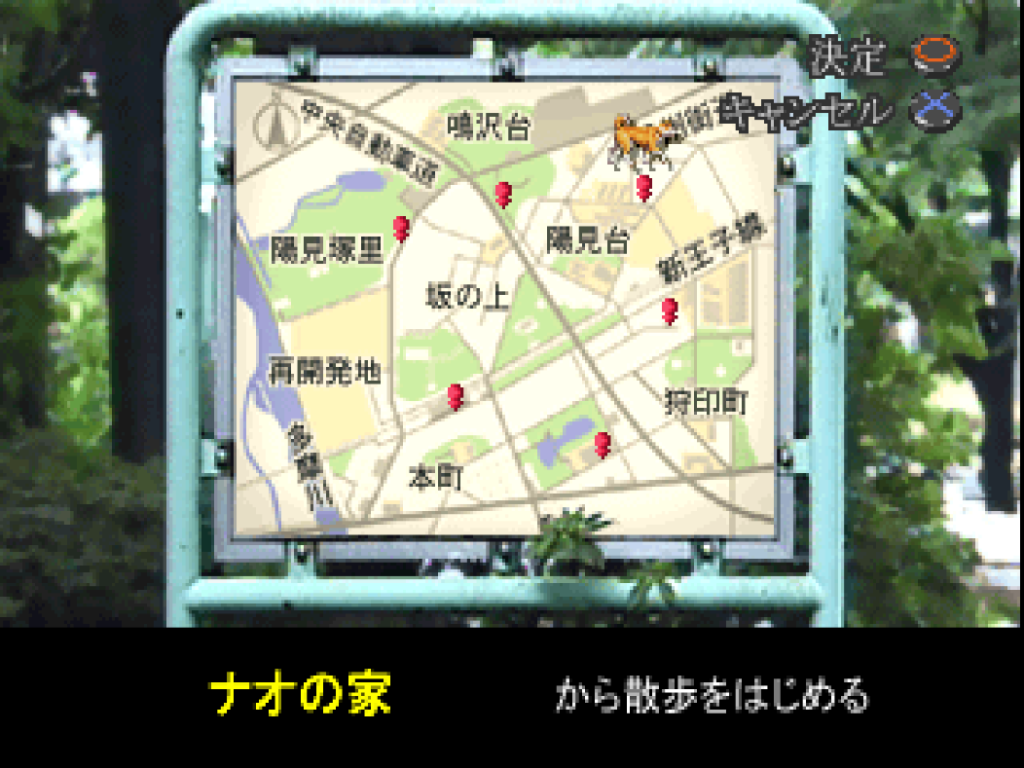
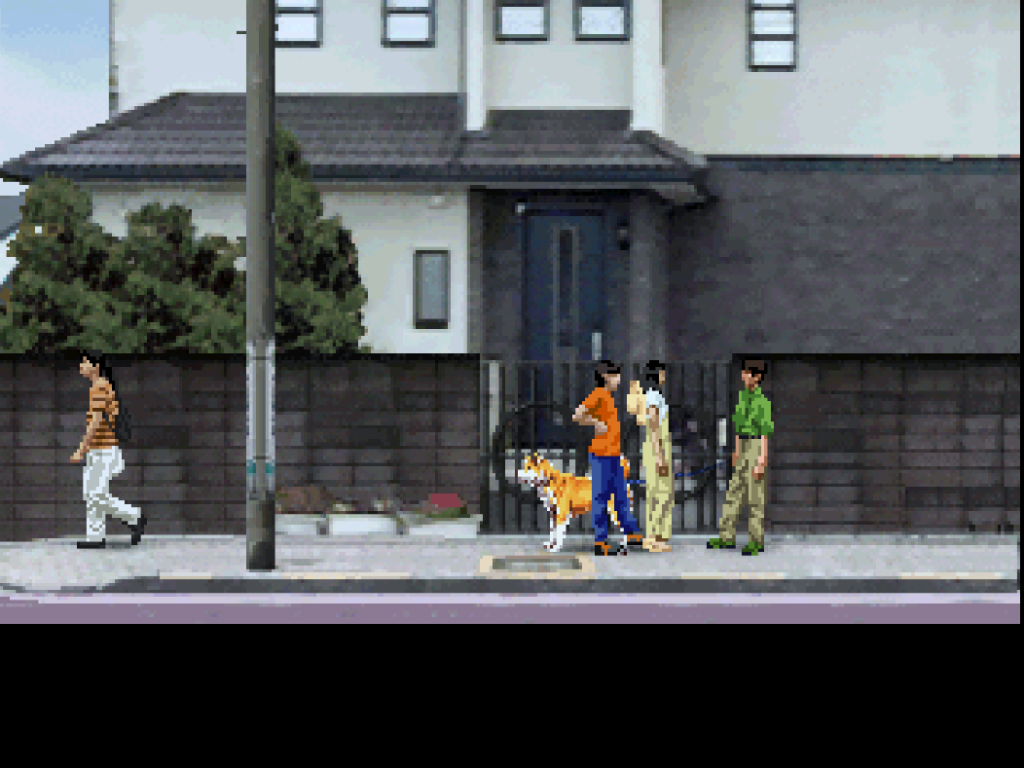
Digging deeper about the end of day checks, I found that Nao’s street evd is at group_08/group_57/file_0011_00027ff1.evd (Note: There are duplicate evd hashes for Nao’s street location at file_0013 and file_0015 with the exact same hash 00027ff1, which means the game has 3 different identical Nao’s street script for different stuff maybe?) by searching for the EVD file header (45 56 44 00 in hex) in memory, the game only stores one EVD file in memory and it’s the current one.
As I said before, when you enter a location (in our cases it’s Nao’s street), the engine allocates a massive 6KB SceneContext block in RAM and maps the following pointer directly from file_0011_00027ff1.evd:
| 0x00000054 – 0x0000008c | Camera & Lighting parameters? |
| 0x0000008c – 0x00000258 | Hotzone / Interaction Boundaries? (23 distinct zones) |
| 0x00000ecc – 0x00007d18 | The main EVD Script Bytecode (The state machine) |
| 0x00007d18 – 0x00008be4 | Sprite / Animation asset references |
The engine restricts physical movement strictly along a predefined X/Z Cartesian plane. Within the Hotzone Table (0x8c), the developers probably mapped out what seems to be 23 collision boxes? The primary street bounds span from X: 3 to X: 1757. If the player goes beyond these coordinates, the game loads the UI map (What street you want to go to).
The End
That’s all I gathered so far, some shit may not be accurate like the EVD files, I couldn’t figure them out properly. I’m sure someone more competent and passionate than me can pick everything I found out so far and improve on it so that we can have a fan translation project going, I’ve lost count how many times I gave up on figuring stuff out in this game. For now, I’m putting this to the side to focus on other things. See you in part 2 (if there will be one).
If you have any comments, questions, concerns, complaints, compliments, you wanna correct me on something, etc then you can contact me on Discord: DennisStanistan or via e-mail at [email protected] – if you contact me via discord then please send a message, i ignore friend requests from people who added me but haven’t messaged me.